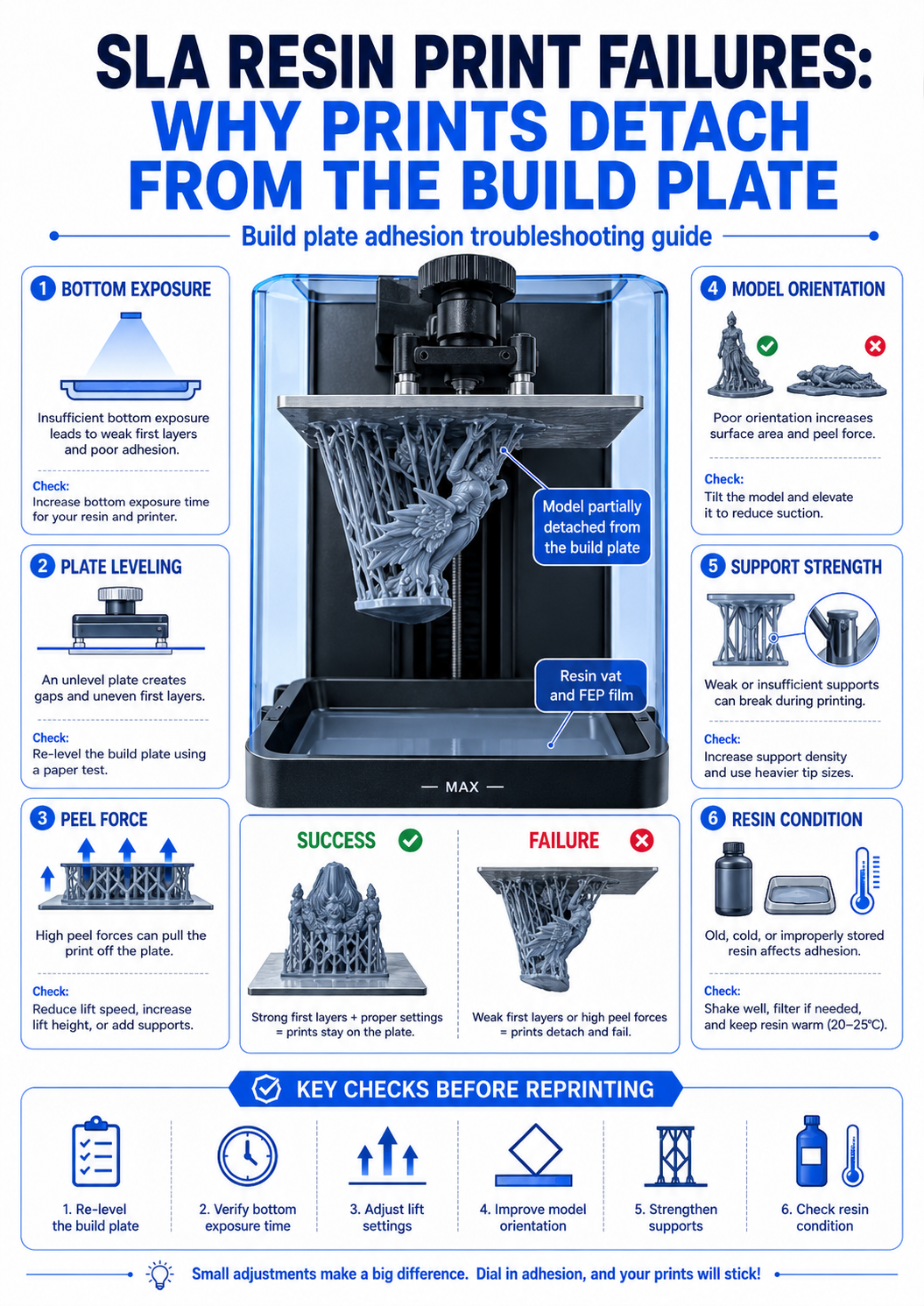
One of the most frustrating resin printing failures is when the print does not stay attached to the build plate.
The printer may start normally, but after some time, the model is missing from the platform.
Sometimes only a few support bases remain.
In other cases, the failed print is stuck to the FEP film at the bottom of the resin vat.
📌 Key Summary
Resin prints can detach from the build plate due to weak bottom exposure, poor leveling, dirty build plate, excessive peel force, or weak support design.
Before increasing exposure time, it is important to check the full printing condition.
Build plate leveling
Build plate leveling is one of the first things to check.
If the build plate is not level, one side may attach well while the other side fails.
This can cause partial adhesion, tilted prints, or complete print failure.
Even a small leveling issue can become a major problem during the first few layers.
If print failures happen repeatedly near one side of the plate, leveling should be checked first.
Bottom exposure time
Bottom layers are usually exposed longer than normal layers.
This helps the first layers stick firmly to the build plate.
If bottom exposure is too short, the print may not bond well to the platform.
If it is too long, the bottom layers may become overly thick or difficult to remove.
The goal is not simply to use the longest exposure time.
The goal is to create stable adhesion without damaging the print or the build surface.
Peel force and model orientation
During resin printing, each cured layer must separate from the FEP film.
This creates peel force.
If the model has a large cross-sectional area, the peel force becomes stronger.
Large flat surfaces placed parallel to the build plate can increase the risk of detachment.
Tilting the model can reduce the layer area and make the print more stable.
📋 Checklist
| Build plate leveling | The platform is evenly leveled |
| Bottom exposure | The first layers are strong enough |
| Build plate surface | The surface is clean and not too smooth |
| Resin condition | Resin is mixed and not contaminated |
| Model orientation | Large flat areas are not parallel to the film |
| Supports | Contact points are strong enough |
✅ Final Notes
When a resin print detaches from the build plate, do not change only one setting.
The failure can be related to leveling, exposure, resin condition, peel force, or support design.
A stable resin print starts with the first layers.
Check build plate adhesion first, then review model orientation and support strength.
'출력불량 분석' 카테고리의 다른 글
| FDM 출력물 들뜸을 줄이는 베드 접착 체크포인트 (0) | 2026.05.25 |
|---|---|
| 3D프린팅 출력불량 원인과 해결 방법 총정리 (1) | 2026.05.25 |
| 레진 3D프린터 노출 시간 설정, 출력 품질에 미치는 영향 (0) | 2026.05.21 |
| 3D프린터 오버행과 브릿지 차이, 출력 실패 줄이는 기준 (0) | 2026.05.20 |
| FDM 첫 레이어 실패 줄이는 베드 세팅법 (0) | 2026.05.18 |


